Nvr Vs Dvr Differences for Home Surveillance
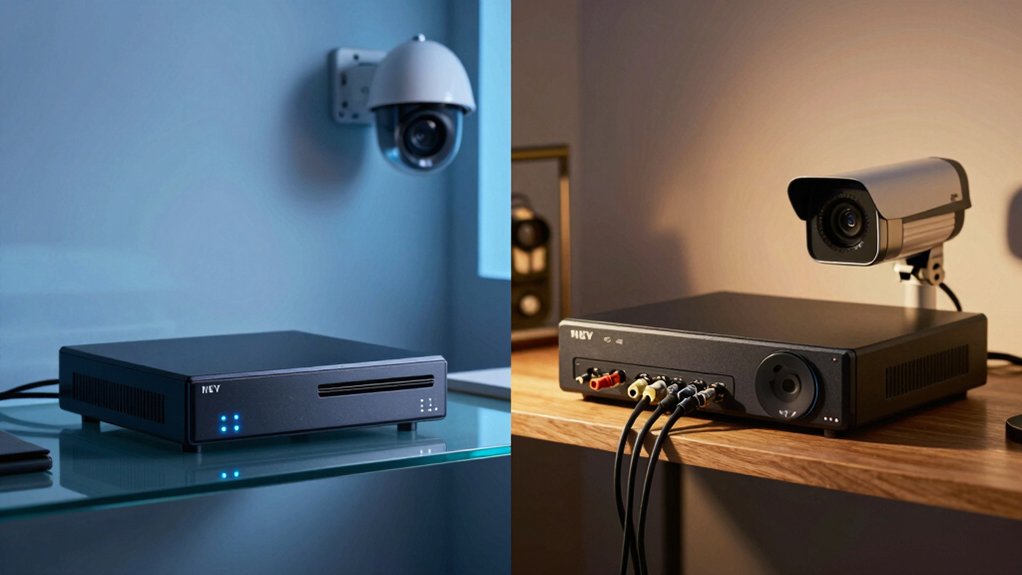
You’ll pick an NVR when you want higher-resolution IP cameras, PoE convenience, native audio, cloud or remote access, and easier analytics.
Choose a DVR to reuse coax, lower upfront cost, and keep the system more locally isolated.
NVRs use Ethernet and onboard camera encoding; DVRs use coax and central encoding.
NVRs scale and support analytics. DVRs save on retrofit wiring.
Keep credentials, firmware, and network segmentation tight: continue for setup, wiring, and privacy guidance.
Nvr Vs Dvr Differences for Home Surveillance: You’ll pick an NVR when you want higher-resolution IP cameras , PoE convenience , native audio, cloud or remote access, and easier analytics. Choose a DVR to reuse coax, lower upfront cost, and keep the system more locally isolated. NVRs use Ethernet and onboard camera encoding; DVRs use coax and central encoding .
Quick Overview
- NVRs use IP cameras that encode video on-camera and stream over Ethernet. DVRs record analog cameras over coaxial cables.
- NVR setups support higher resolutions, smarter analytics, and easier remote access than DVR systems.
- DVRs are usually cheaper initially and let you reuse existing coax wiring in small homes.
- NVRs simplify installation with PoE: one Cat5e/6 cable per camera, and scalable camera additions.
- Security trade-offs exist: NVRs increase remote attack surface and need encryption, VLANs, MFA, and firmware updates.
Quick Decision: When to Choose NVR vs DVR for Your Home
Wondering which system fits your home? You’ll pick an NVR when moving to IP cameras: processing happens at the camera, PoE simplifies power and network, and scalability plus remote/cloud access make advanced analytics and native audio practical.
Choose a DVR if you’re tied to existing coax and analog cameras or you need a lower upfront cost. DVRs accept mixed inputs; you can extend the life of legacy devices.
For home networks, NVRs offer easier installation options with thin Ethernet runs and integrated switching. DVRs require direct coax runs to the recorder. If remote viewing, higher image quality, or analytics matter, NVRs give superior results.
For privacy considerations, keep in mind IP systems expose network endpoints: use strong credentials, segmented VLANs, and encrypted remote links. Transition gradually: start hybrid (DVR with IP inputs or NVR with analog adapters) and migrate fully to IP as budget and wiring permit.
Best Article Format and Intent for “NVR vs DVR
You’ve just weighed practical differences for choosing NVR vs DVR; now shape the article so readers can quickly apply that guidance. Keep intent focused: help readers pick based on network capability, cabling, budget, and privacy concerns. Outline formats that prioritize actionable comparisons, installation steps, and trade-offs like cloud storage versus local retention.
- Quick decision matrix: network vs coax, resolution, cost, scalability.
- Installation checklist: PoE switches, cable runs, power needs, recorder placement.
Privacy and retention: local storage benefits, cloud storage trade-offs, encryption basics.
Performance notes: where encoding happens, analytics capability, audio wiring implications.
Write sections in order: summary, short pros/cons, step-by-step setup, real-world scenarios. Use tables or matrices for specs and a small glossary for terms like PoE, BNC, and encoding. That structure keeps technical readers efficient and homeowners confident. This lets them act on the NVR vs DVR choice without wading through unnecessary theory.
How DVR Systems Work: Cameras, Coax and Recorder Roles
How do DVR systems actually put analog cameras on record? You run analog CCTV cameras to the DVR using coaxial BNC cables, often in Siamese form that supplies separate power and video. At the recorder, the DVR performs local video processing and encodes the incoming analog waveform into a digital stream for storage and playback. You’ll keep runs under roughly 90 meters (300 feet) to avoid significant signal degradation. Beyond that, coax quality becomes critical, and you’ll see noise or loss.
You’ll also manage audio separately. Standard coax carries video, so audio typically needs RCA wiring or auxiliary inputs. Effective interference mitigation involves proper grounding, shielding, and using higher-grade coax to limit ingress and crosstalk. Some DVRs are hybrid; they accept a few IP inputs so you can migrate cameras gradually without replacing the entire recorder.
You configure recording schedules, compression settings, and retention at the DVR, which remains the system’s central processing and storage hub.
How NVR Systems Work: IP Cameras, PoE and Network Storage
Why does an NVR-based system feel simpler to install? You connect IP cameras to your network, and each camera encodes video on-board before sending streams to the NVR over Ethernet. When cameras use PoE, a single Cat5e/6 cable delivers power and data, cutting cable runs and avoiding separate power supplies.
NVRs lack traditional analog video inputs; they accept network streams and often include an integrated PoE switch for direct camera connections. You’ll configure IP addresses so cameras and the NVR are on the same secure subnet. This configuration enables remote access and centralized management. Footage can be saved locally on the NVR or directed to cloud network storage depending on your policy.
Key considerations:
- Camera encoding: processing occurs at the camera, reducing recorder load.
- PoE wiring: simplifies power/data delivery over one cable.
- Network config: static or DHCP reservations maintain camera reachability.
- Storage options: onboard HDD vs. cloud network storage choices.
Video, Audio and Analytics: Practical Performance Differences (NVR vs DVR)
Curious what actually changes when you pick an NVR over a DVR? You’ll see immediate differences in video quality and system capabilities. NVRs use IP cameras that encode and send digital video and audio over Ethernet, so you get higher resolution, clearer footage, and native audio capture at the camera. DVRs ingest analog signals and encode internally, which limits image fidelity and often lacks robust audio support.
In practice, analytics—motion detection, face recognition, object classification—are easier to deploy and more accurate on NVR/IP setups because they work with clean digital streams and metadata. NVRs also scale better and support remote access with lower effective latency to analytics triggers. Note that network configuration can still introduce video latency if congested.
DVRs can be cost-effective initially but offer fewer smart features and more friction when upgrading resolution. Finally, camera placement matters: IP cameras give flexible placement within your network, letting you optimize field of view and analytics performance without analog run constraints.
Wiring and Retrofits: Reusing Coax vs Switching to Ethernet
When planning a retrofit, the wiring choice shapes cost, complexity, and future flexibility. Reusing coax can save time and money up front; however, switching to Ethernet (Cat5e/Cat6) unlocks PoE, higher resolutions, native audio, and easier expansion. You’ll weigh coax vs Ethernet realities: coax may let you keep analog cameras with separate power (Siamese), but it limits power delivery and degrades over long runs. Ethernet gives PoE and standardized 100 m links that are extendable with switches or fiber.
For wiring retrofits, consider these practical points:
- Use coax if you need minimal disruption and plan a hybrid DVR/NVR approach to reuse legacy cameras.
- Choose Ethernet to enable centralized PoE switches, plug-and-play IP cameras, and native audio.
- Expect more installation work running new Cat5e/Cat6 through walls/ceilings; however, you will gain easier expansion and higher resolutions.
- For long distances, prefer Ethernet plus extenders or fiber rather than relying on degraded coax signals.
Costs and Maintenance: Upfront, Recurring, and TCO (NVR vs DVR)
How much you’ll pay over time depends on more than the sticker price; think in terms of upfront hardware, recurring fees, and future expansion. DVR hardware and analog cameras cost less initially; NVRs require pricier IP cameras, PoE switches, and sometimes professional installation. However, reduced labor can offset some expense. Consider warranty coverage on cameras and recorders: longer warranties lower replacement risk for both platforms.
Recurring costs differ: DVRs usually have minimal subscriptions, while NVRs may incur camera licenses, VMS updates, and cloud storage fees. Factor potential service contracts for routine maintenance or patch management, especially for networked NVRs.
Maintenance complexity affects TCO: DVRs use coaxial runs and simpler local upkeep. NVRs demand firmware updates, network monitoring, and PoE management. NVRs scale more easily, so expansion costs per camera tend to be lower long term despite higher upfront spend. TCO depends on planned growth, required features, and how much you value remote access and analytics.
Home Remote Access and Privacy Risks (NVR vs DVR)
Cost and maintenance choices affect more than budgets; they shape how your system connects to the outside world and what privacy risks you accept. You’ll find NVRs prioritize remote access via IP cameras and cloud apps, increasing attack surface. DVRs usually run locally, reducing exposure but limiting off-site monitoring. Both demand secure authentication, firmware updates, and network controls to mitigate privacy risk.
NVRs: IP streams may traverse the internet; enforce encryption, strong passwords, and VLAN segmentation.
DVRs: Analog systems often stay isolated. Enabling remote access requires careful port management and VPNs.
Common controls: Apply MFA where available, schedule updates, and audit user accounts regularly.
Threat model: Unpatched devices and weak credentials enable breaches regardless of architecture.
You should weigh the operational need for remote access against the increased risk profile. Apply layered defenses to maintain acceptable privacy risk while preserving functionality.
Recommended Setups by Home Type and Scale
Which setup fits your home and scale depends on wiring, growth plans, and how much remote access you need. For small homes with existing coax, choose a DVR to leverage coax expansion and minimize installation cost. It’s simplest when most cameras are analog or hybrid. If you want gradual upgrades, use a tri-brid DVR to accept IP inputs while keeping legacy cabling and local, closed-network operation.
For mid-sized homes, deploy an NVR with PoE IP cameras to simplify cabling; one Ethernet delivers power, video, and audio. This setup allows you to scale easily as you add cameras. Prioritize 4K compatibility on the NVR and cameras if you need high resolution.
For multi-story or larger homes, favor NVRs for better remote access, cloud options, and straightforward extension via networked IP cameras instead of extensive rewiring. If budget is tight, start with a DVR for mixed inputs. Plan staged migration to an NVR as you replace endpoints and require greater bandwidth and features.
Frequently Asked Questions
Can I Mix IP and Analog Cameras on the Same Recorder?
Yes, you can mix IP cameras and analog cameras at all, but only on hybrid recorders or via gateways. You’ll need a DVR/NVR hybrid or an analog-to-IP encoder so your recorder supports both protocols.
Configure IP camera IPs, stream settings, and analog channel mappings. Then sync time, recording schedules, and storage. Expect varied resolution, latency, and feature support. Plan bandwidth and PoE/power distribution accordingly to avoid performance issues.
Do NVRS or DVRS Support Battery-Backed Storage During Power Outages?
Yes, most NVRs and DVRs can use battery-powered storage solutions for power outage resilience. You’ll add a UPS or battery-backed NAS to keep local recording running. Some cameras have onboard SD for short-term backup.
Consider cloud vs local backup trade-offs: cloud preserves footage offsite but raises subscription costs and privacy implications. Local battery-backed storage keeps data private but needs maintenance and secure physical access.
Which System Is Better for Pet Detection and Smart Home Integration?
You’ll generally find NVRs better for pet detection and smart home integration. Which system you pick depends on pet detection vs. smart home needs: NVRs offer more advanced analytics and easier cloud/AI connections, while DVRs are simpler.
Expect integration challenges around platform compatibility, APIs, and firmware. Verify camera analytics, supported ecosystems (HomeKit, Alexa, Google), and third-party plugin support to ensure reliable pet alerts and seamless automation.
How Do Firmware Updates and Vendor Lock-In Compare?
Firmware updates matter: You’ll get more frequent, feature-rich patches from modern NVR/IP vendors; DVR systems often see fewer updates. Firmware updates can fix bugs, add analytics, and improve security. Therefore, check release cadence.
Vendor lock-in varies: Many IP ecosystems lock you to cameras and cloud services. However, some DVRs are more open but older. You’ll want vendors with clear update policies and open standards to avoid lock-in.
Are There Privacy Differences When Using Cloud Backups With DVRS?
Yes, you face extra privacy implications when using cloud backups with DVRs. You’ll send footage offsite, which increases attack surface and reliance on vendor cloud backup security.
Data-in-transit and at-rest protections, access controls, retention policies, and vendor logging matter. You should verify encryption standards, multi-factor access, and breach notification.
Consider local-only storage or hybrid models if you want tighter control over who can access your recordings.
Conclusion
Choose NVR if you want higher image quality, easier analytics, PoE convenience, and future scalability. Pick DVR if you’re reusing coax, need lower upfront camera costs, or want simpler, proven tech.
Factor wiring effort, storage needs, remote access setup, and privacy trade-offs into total cost. For small homes or retrofits, DVR often wins. For new installs, multi-camera coverage, or smart features, NVR is usually the better long-term choice.
Related reading: Wireless NVR Camera Systems with Hard Drive for — a closer look at this topic.