Security Camera Privacy Guidelines for Indoor Placement
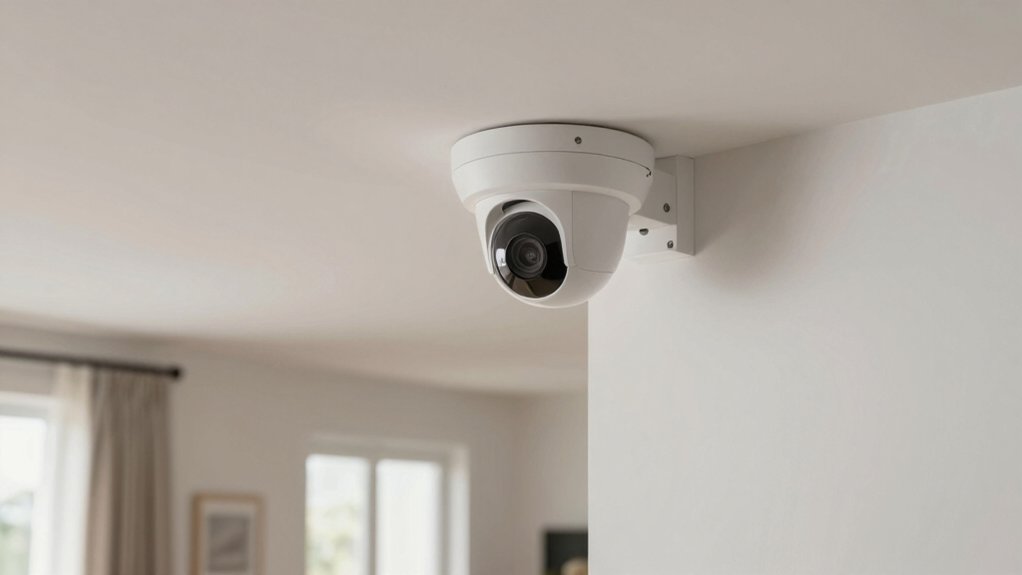
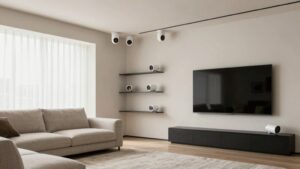
Place cameras in common areas: entryways, hallways, stairs, and living rooms. Avoid bedrooms, bathrooms, and views into neighbors’ windows. Mount cameras in room corners about 8–10 feet high, tilted down to capture faces and deter tampering.
Use privacy masking, motion zones, and turn off audio unless you have clear consent. Post notices, document retention and access rules, and audit settings after updates. Follow these steps and you’ll reduce privacy risk and meet legal and policy obligations as you learn more.
Security Camera Privacy Guidelines for Indoor Placement: Place cameras in common areas : entryways, hallways, stairs, and living rooms. Avoid bedrooms, bathrooms, and views into neighbors’ windows. Mount cameras in room corners about 8–10 feet high, tilted down to capture faces and deter tampering. Use privacy masking , motion zones, and turn off audio unless you have clear consent.
Quick Answer: Where to Put indoor security cameras
Where should you place indoor security cameras to balance safety and privacy? You should prioritize indoor placement in main hallways, staircases, and common living areas to cover high-traffic zones while avoiding private rooms like bedrooms and bathrooms.
Mount cameras about 8 to 9 feet high to deter tampering and still capture clear facial details. Use wide-angle lenses in larger rooms and corners so you need fewer devices to maintain effective coverage. Position devices away from direct bright windows or lamps to reduce glare and backlighting that degrade evidence quality.
Inform household members and guests about camera presence as a routine policy step, and document consent or notification where appropriate. Implement privacy considerations such as masking features or limiting storage and access to footage to reduce exposure of sensitive areas.
These steps help you meet safety objectives, comply with reasonable expectations of privacy, and minimize legal and reputational risk without sacrificing situational awareness.
Safe Indoor Areas to Record With Security Cameras
Choosing safe indoor areas to record means prioritizing shared, high-traffic spaces, like entryways, hallways, stairwells, and common living areas, while expressly avoiding private rooms such as bedrooms and bathrooms to respect privacy expectations and reduce legal risk. You should place cameras where they observe movement without capturing intimate activities.
Mount cameras about 8 to 9 feet high to deter tampering and still record usable facial detail. Use privacy masking and selective recording to exclude adjacent private rooms or windows. Focus on entry points and high traffic areas to maximize situational awareness with minimal intrusion.
- Entryways: Monitor arrivals and departures; configure recording triggers to limit continuous capture.
- Hallways/stairwells: Cover transit routes only; avoid angles that view room interiors.
- Common living areas: Balance visibility with posted notices and consent where appropriate.
- Shared workspaces: Restrict fields of view to communal zones and enable privacy masking for desks or cubicles.
Follow policy, document placement rationale, and keep retention minimal to reduce risk.
Where Never to Point Cameras (Bathrooms, Bedrooms, Changing Areas)
Moving from shared spaces to places you must never monitor, do not point cameras at bathrooms, bedrooms, or changing areas. These locations carry strong privacy expectations and are generally off-limits for video surveillance. You should treat these rooms as off-limits regardless of property ownership. Capturing intimate spaces creates legal risk and fuels complaints.
Adopt two word ideas like “privacy masking” and “visible signage” to reduce exposure when cameras sit near private rooms. Position devices to cover halls and living areas only, and use masking to block any line of sight into private rooms. If a camera must be adjacent to a bedroom or bath, notify occupants with clear signage. Reorient immediately to avoid accidental capture.
Regularly review footage and angles as part of policy enforcement to detect privacy pitfalls before they escalate. Enforce simple rules: no direct views, documented justifications for exceptions, and prompt correction if any private area appears in recordings.
Best Mounting Heights and Angles for Indoor Security Cameras
How high should you mount indoor cameras to balance visibility and security? Mount cameras about 8–9 feet high to deter tampering while keeping facial features clear. Position units in corners of main hallways, staircases, and common areas to maximize wide-angle coverage and reduce blind spots. Avoid pointing devices at private spaces like bedrooms and bathrooms.
- Mount height: 8–9 feet deters interference and preserves ID quality; adjust slightly for ceiling height.
- Angle and placement: Corner mounts with downward tilt capture movement along corridors and stairs while minimizing intrusive views.
- Lighting and glare: Ensure interior lighting supports clear footage. Avoid direct window glare that washes out images.
- Privacy controls: Use privacy masking to exclude sensitive areas and configure motion zones to focus alerts on relevant pathways.
Follow policy-minded placement: prioritize common areas, minimize privacy intrusion, and document mounting decisions for accountability and risk management.
Device Settings to Protect Privacy (Audio Off, Privacy Masking, Motion Zones)
With mounting locations and angles set to limit blind spots, you should now lock down device settings that directly control what gets captured and stored. Disable audio recording by default to reduce legal and privacy risk; audio laws vary by state and guidance commonly advises turning off indoor microphones.
Next, use privacy masking to blackout bedrooms, bathrooms, and other sensitive zones so footage never includes those areas. Configure motion zones to focus detection on entrances, hallways, and living spaces where security value is highest; narrow zones limit false alerts and unnecessary data retention. Set camera height around 8 to 9 feet to balance tamper resistance with clear face capture in main circulation areas.
Regularly audit your settings after firmware updates and document choices for compliance and accountability. Avoid directing lenses toward neighbor windows or private areas outside your jurisdiction. These device-level controls reduce surveillance scope, lower legal exposure, and keep stored footage proportionate to legitimate security needs.
Can your indoor camera ever point at a neighbor’s private space? You shouldn’t. Prioritize indoor privacy and neighbor awareness by positioning cameras to avoid bedrooms, bathrooms, or any area that belongs to someone else. This applies even if seen from your windows or shared halls. Use visible, mounted units at about 8 to 10 feet to deter tampering while still capturing main-space activity. Inform household members and follow local consent rules.
- Place cameras toward common areas (living rooms, hallways) and away from windows that overlook neighbor property.
- Use privacy masking and motion zones to block or ignore views of adjacent private spaces.
- Prefer visible cameras over hidden devices to reduce disputes and signal respect for neighbor awareness.
- Confirm placement complies with local surveillance rules and notify household members to reduce legal and relational risk.
Stay policy-minded: Avoid encroaching views. Document your choices and adjust placements if neighbors raise concerns.
Key Legal Points: Audio Consent, Retention, Notice, and Documentation
Because audio and video laws vary widely and are tightening, you should treat indoor footage as regulated personal data and design your camera practices accordingly. You must verify whether your jurisdiction requires one-party or all-party audio consent before enabling microphones. When in doubt, disable audio and use privacy masking.
Provide clear, conspicuous notice that surveillance is active to meet evolving notice obligations and reduce liability. Adopt a documented retention schedule, limit access, and perform periodic audits. Documentation retention should record policies, access logs, and deletion events. Keep records long enough to demonstrate compliance but not longer than necessary under applicable law.
| Topic | Action | Rationale |
|---|---|---|
| Audio consent | Confirm law; disable if unclear | Avoid illegal recording |
| Notice | Post visible signs | Satisfies notice obligations |
| Retention | Set fixed retention periods | Limits exposure |
| Access control | Define roles, log access | Prevent misuse |
| Documentation retention | Archive policies & audits | Evidence of compliance |
Troubleshooting Privacy Pitfalls and Quick Fixes
Where should you start when a camera setup raises privacy flags? Begin by isolating the issue: check sightlines, confirm cameras do not face bedrooms, bathrooms, or neighbors’ windows, and verify audio is disabled where required. Audit recordings against your data retention policy to ensure you are not keeping footage longer than necessary.
- Reposition cameras to focus on hallways and common areas; keep them at 8–10 feet height to deter tampering while maintaining useful views.
- Apply privacy masking to block sensitive zones (windows, private rooms) and test masks from multiple angles and lighting conditions.
- Confirm audio recording is turned off or consented per law; document consent and notice to occupants to reduce legal risk.
- Update signage, access controls, and your documented data retention schedule. Routinely review logs and purge footage per policy.
Act quickly; document every fix and maintain a risk-aware checklist so small privacy gaps do not become compliance failures.
Frequently Asked Questions
Can Landlords Install Indoor Cameras in Rented Living Rooms?
Generally no: you shouldn’t allow a landlord camera in your rented living room without clear consent or legal justification. You’re entitled to rent privacy. Landlords can’t surveil private living spaces where tenants expect privacy.
Limited exceptions exist for safety, maintenance, or court orders; however, they require notice, narrow scope, and legal basis. Insist on written policies, ask for camera removal or relocation, and consult local tenant-law resources or an attorney for risks.
Do Nanny Cams Require Consent From Household Members?
Yes, you generally need nanny cam consent where laws or household member rights require it. You should check state and local statutes: some places mandate consent from adults in common areas; private spaces like bedrooms and bathrooms are usually off-limits.
Document legitimate safety or childcare reasons, post notices, and get written permission when possible. Failing to respect consent and household member rights can create legal and liability risks you don’t want.
How Do Smart Displays With Cameras Fit Privacy Rules?
Smart displays with cameras count as indoor cameras and carry clear privacy implications. You should treat them like other indoor cameras: inform household members, obtain consent considerations where reasonable, and limit placement to communal areas to reduce risks.
Disable or cover cameras in private spaces. Use strong access controls and document policies for recordings and data retention. That minimizes legal exposure and protects personal privacy while keeping functionality.
Yes, you can share motion-activated clips externally, but you shouldn’t do so without assessing privacy implications and establishing clear data retention limits. You’ll need consent when clips capture identifiable people. Minimize shared content to necessary footage; encrypt transfers; and log access.
Define retention periods, delete clips when no longer needed, and apply access controls and auditing. Treat sharing as a policy decision tied to legal and reputational risk management.
What Records Should I Keep for Privacy Compliance?
You should keep access logs, consent records, incident reports, and audit trails. You should also keep data retention schedules and deletion confirmations.
Maintain privacy logs documenting who viewed footage, why, and when. This includes recording processing purposes, legal bases, and disclosure records. Retain security camera configuration snapshots, retention-period policies, and breach notifications.
Ensure logs are immutable, access-controlled, and routinely reviewed. Align retention durations with legal requirements and purge data per your documented data retention plan.
Conclusion
Follow these guidelines to balance safety with privacy. Place cameras in common indoor areas you control: living rooms, entryways, kitchens. Avoid bathrooms, bedrooms, and changing spaces.
Mount cameras at eye level; angle them to capture activity without focusing on private zones. Turn off audio, use privacy masking and motion zones, and limit retention.
In shared or multi-tenant buildings, get consent, post notice, and document policies. If concerns arise, adjust angles, enable masking, or remove the device.
Related reading: Legal Considerations for Outdoor Security Cameras at Home — a closer look at this topic.