Security Camera Resolution 1080P Vs 2k Vs 4k Explained
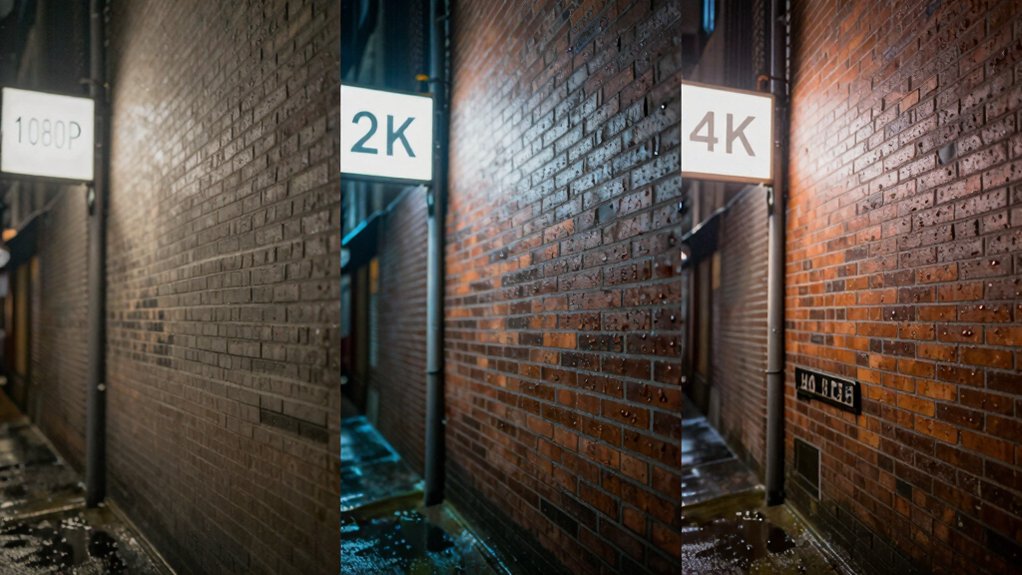
You want the right pixel count where it matters: 1080p (≈2.1M pixels) is fine for doors and small homes. 2K (≈3.7M) gives clearer faces and wider coverage with moderate storage increase; 4K (≈8.3M) delivers significant forensic zoom and plate recognition at distance but demands much more network and disk.
Resolution alone won’t guarantee detail. Lens quality, sensor size, placement, and compression do. So choose based on target distance and your bandwidth/storage limits; more specifics follow.
Security Camera Resolution 1080P Vs 2k Vs 4k Explained: You want the right pixel count where it matters: 1080p (≈2.1M pixels) is fine for doors and small homes. 2K (≈3.7M) gives clearer faces and wider coverage with moderate storage increase; 4K (≈8.3M) delivers significant forensic zoom and plate recognition at distance but demands much more network and disk.
What Security Camera Resolution Means and Why It Matters
Clarity in surveillance starts with resolution: it’s the pixel count a camera records (width x height), and that count—1080p at 1920×1080, 2K at 2560×1440, 4K at 3840×2160—directly controls image detail and effective zoom. You’ll rely on resolution to resolve faces, license plates, and small scene features. Higher pixel counts yield sharper footage and greater digital zoom without immediate pixelation.
Remember, resolution isn’t solitary: lens quality, sensor size, and lighting determine usable detail. So upgrading resolution alone won’t guarantee identification at distance. Higher resolutions increase storage and bandwidth demands, affecting retention policies and network provisioning. That has a privacy impact you must assess: more detailed footage raises data sensitivity, access controls, and compliance requirements.
Also factor camera placement and field of view: a high-resolution camera placed poorly still won’t capture critical targets. Balance resolution, optics, placement, and infrastructure to meet operational goals while minimizing unnecessary data collection.
1080P Vs 2K Vs 4K : Pixels, Real-World Detail, and Zoom
How much difference does resolution actually make when you zoom or identify a subject? You’ll see it quantitatively: 1080p (1920×1080 ≈2.07M), 2K (2560×1440 ≈3.68M), and 4K (3840×2160 ≈8.29M) scale pixel density and resolving power. 1080p vs 2K is a clear step-up in detail and moderate storage increase. 4K vs offers a much larger jump that materially improves face and plate recognition at distance.
Field of view interacts with these counts; higher resolution lets you preserve identification detail across wider scenes, reducing camera count when infrastructure supports it. The trade-offs are concrete: storage and bandwidth scale roughly with pixel count and frame rate. 4K requires robust network and storage unlike 1080p or 2K. Choose resolution based on required identification distance, available bandwidth, and storage budget.
- Identification range improves nonlinearly with pixel count.
- Storage and bandwidth rise with resolution and frame rate.
- Wider FOVs retain usable detail only if resolution is sufficient.
Which Resolution to Pick: Home, Parking Lot, Retail, and Large Sites?
Which resolution should you pick depends on the environment, the identification distance you need, and your storage/network constraints. For a typical home, 1080p usually suffices: it gives clear entrance and hallway views while keeping storage and bandwidth modest. It performs well under varied home lighting conditions.
For parking lots, choose 2K or 4K when you must identify license plates or cover wide areas with fewer cameras. Higher pixel counts help compensate for longer identification distances but are more sensitive to weather impact on image clarity.
In retail, 2K commonly strikes the best balance: improved facial and item detail without the exponential data load of 4K. Large sites or campuses benefit from 4K for expansive coverage, forensic zoom, and improved recognition across wide fields.
In every case, understand that increasing resolution reduces camera count but increases storage, bandwidth, and demands on analytics or compression to maintain usable performance.
Storage, Bandwidth, and Cost Trade‑Offs for 1080p/2K/4K
Why does resolution matter beyond image detail? You need to weigh storage, bandwidth, and lifecycle cost when choosing 1080p, 2K, or 4K. 1080p minimizes disk and network load, giving the lowest per-camera cost and simpler network scaling.
2K raises storage and bandwidth moderately while improving identification capability; this is a middle ground for budgeting tradeoffs. 4K multiplies pixel count (~8.29M) and drives much larger drives or cloud fees. It also requires stronger switches and throughput.
- 1080p: lowest storage/bandwidth, best for tight budgets and small systems.
- 2K: balanced quality vs storage; useful when better detail justifies moderate cost increases.
- 4K: highest resource demand but can reduce camera count for wide areas; this partially offsets costs.
Use efficient codecs (H.265) and plan retention policies. Analyze per-camera throughput, aggregate network scaling, and total cost of ownership to match resolution choice to operational and budget constraints.
How to Get the Most From Your Resolution: Lens, Placement, Compression, and AI
Want to get true value from 1080p, 2K, or 4K footage? Start by treating resolution as one element in a system: Lens quality and sensor size set your baseline detail, so pair 4K sensors with sharp optics to avoid wasted pixels. Position cameras to optimize field of view for target areas: Narrow FOV for identification, wide FOV for coverage, and reduce occlusion and motion blur.
Use efficient compression (H.265 or similar) to lower network bandwidth and storage demands while preserving critical detail. Tune bitrate targets rather than relying on default VBR. Enable AI analytics at the edge when possible so facial recognition or LPR extracts metadata without constant full-frame retrieval. This cuts playback and retention costs.
Monitor actual bandwidth and storage usage, then iterate: Adjust aperture, focal length, mounting height, compression profiles, and AI thresholds until you achieve the minimum storage and network bandwidth that still meets identification requirements.
Frequently Asked Questions
How Does Resolution Affect Facial Recognition Accuracy at Different Distances?
You’ll see facial recognition accuracy drop as distance increases because pixels-per-face shrink, forcing distance scaling that reduces identifiable features. At close range, you’ll get high feature fidelity. Mid-range requires better optics and algorithms to compensate for reduced pixel density.
Beyond a threshold, even advanced models misidentify or fail. To optimize, you’ll balance sensor resolution, lens, and distance scaling parameters so the system preserves critical facial landmarks for reliable matches.
Can 2K or 4K Cameras Work Reliably in Low-Light Without IR?
No, 2k or 4k cameras won’t reliably replace IR in low light by themselves. You’ll need Discussion ideas: increase sensor size, use larger aperture lenses, enable aggressive noise reduction, or add supplemental lighting.
Low light workarability improves with better sensors and processing; however, higher pixel counts can amplify noise per pixel. For reliable identification, you should combine high resolution with low-light-specific hardware or active illumination rather than relying solely on 2k/4k.
Do Higher Resolutions Increase False Positives in AI Detection?
Yes, higher resolutions can increase false positives in AI detection if models aren’t adapted. You’ll capture more detail and noise; therefore, algorithms may misclassify textures, shadows, or reflections as targets.
You should retrain models with high-res data, apply calibrated thresholds, and use multi-scale preprocessing to reduce spurious detections. Also, factor in privacy limits when storing or processing higher-detail imagery to avoid regulatory and ethical issues.
Can 4K Footage Be Live-Streamed Over Mobile Networks?
Yes, you can live-stream 4K, but it depends on mobile bandwidth and network stability. You’ll need sustained uplink speeds of often 15–25 Mbps or more per stream, low latency, and efficient codecs such as HEVC or AV1 to compress without excessive bitrate.
Carrier variability, data caps, and device CPU constraints can force adaptive bitrate downshifts. For reliable 4K streaming, prioritize strong 5G or LTE coverage, hardware acceleration, and network congestion management.
Are There Legal/Privacy Limits to Recording at Ultra-High Resolutions?
Yes, you’ll face legal and privacy limits when recording at ultra-high resolutions. You’ll trigger greater privacy concerns because identifiable details increase liability. Many privacy laws restrict capture of private spaces and require notices, retention limits, and lawful purpose.
You’ll also incur higher storage costs and must implement stronger access controls, encryption, and retention policies. Conduct a data-protection impact assessment, document lawful basis, and minimize resolution or retention where not required to mitigate risks.
Conclusion
You’ve seen how resolution affects pixel count, true detail, zoom capability and practical ID range. You have also seen how higher-res footage increases storage, bandwidth and cost. Choose 1080p for basic coverage; choose 2K for clearer midrange detail, and choose 4K when fine identification or wide-area coverage matters. Balance that against infrastructure limits.
Optimize results with proper lenses, correct placement, efficient compression and AI analytics so the resolution you pick actually delivers usable forensic information.
Related: Camera Coverage Planner Calculator Field of View Distance